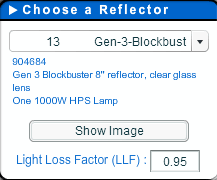
Choose a Reflector
Choose the reflector you would like to use. Data is defaulted based on the manufacturers data for the reflector you selected. Click on "Show Image" to view a photo of the reflector.
Lighting Loss Factor: Most lamp manufacturers rate their lamps by “Average Life Hours” and usually claim 10,000 to 24,000 hours. These ratings are based on when the lamp will completely fail to come on. They do not factor in loss of intensity or loss of color. HID lamps lose intensity and color through normal use. This is OK if you are lighting a warehouse, but when it comes to plant growth, these losses can mean wasted electricity and poor plant performance. Serious horticulturalists recommend that you replace your lamps after 6000 hours of use. This equates to using your light 16 hours a day for one year.
Lighting Loss Factor: Most lamp manufacturers rate their lamps by “Average Life Hours” and usually claim 10,000 to 24,000 hours. These ratings are based on when the lamp will completely fail to come on. They do not factor in loss of intensity or loss of color. HID lamps lose intensity and color through normal use. This is OK if you are lighting a warehouse, but when it comes to plant growth, these losses can mean wasted electricity and poor plant performance. Serious horticulturalists recommend that you replace your lamps after 6000 hours of use. This equates to using your light 16 hours a day for one year.
Room Dimensions
Enter the dimensions of your room. You can switch from feet to meters on the Units tab.
- Workplane Height - the height from the floor where your light will be measured/calculated
- Suspension Length - the distance from the ceiling to the top of the fixture
IMPORTANT: For best results, the Length (X) dimension should be the largest room dimension.

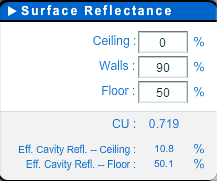
Surface Reflectance
Estimate the reflectance of your ceiling, walls and floor. You can increase this by adding a reflective film to the surfaces in your room.
- Greenhouse Film: 90-95%
- Flat White paint: 75-80%
- Gloss White paint: 70-75%
- Yellow paint: 65-70%
- Aluminum foil: 60-65%
- Black/Other: 10% or less
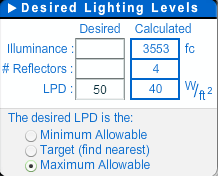
Desired Lighting Levels
- Illuminance – enter the desired amount of light you would like to be calculated on your Workplane. This can be done in Foot Candles or Lux.
- # of Reflectors – enter the number of reflectors you would like to use. The software will evenly distribute the fixtures as best as possible.
- Lighting Power Density – Enter the desired wattage per square foot
PPFD Output Calculator
Layout (Optional)
Choose the layout of you room. This will default to the optimal layout based on the dimensions of your room. Check the checkbox to enable editing.

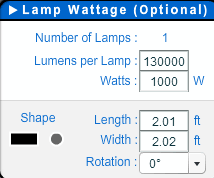
Lamp Details (Optional)
Enter the lamp information. This will be defaulted with the manufacturers data when you choose a reflector.
- Rotation – enter the desired rotation of the light fixture. Entering 90 will rotate fixtures 90 degrees.
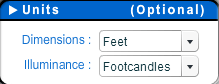
Units (Optional)
Change the units of measurement.
Print/Help
Select Print Preview to print the page. You will be able to add a title, description, and prepared by/for information before printing.